Domain Controller and Operating System Checks: Unsupported Windows, Orphaned and Inactive Domain Controllers
Find computers running a Windows release Microsoft no longer updates, and domain controller accounts that were left behind or have gone quiet.
On this page
- Overview
- Prerequisites
- Computer running an unsupported version of Windows
- What it checks
- How severe a finding is
- Which releases are past support
- Extended Security Updates
- What the finding shows
- How to fix it
- Domain controller account left behind after decommission
- How to fix it
- Domain controller with no recent logon
- Why a controller check reads Not assessed
- Reviewing and acting on a finding
- Configuration
- Troubleshooting
- A computer you know is out of support isn't listed
- A computer under Extended Security Updates is listed
- A computer reads Low although it's a server
- Both domain controller checks read Not assessed
- A decommissioned controller isn't in the orphaned list
Overview
A computer on a release that no longer gets security updates keeps every vulnerability found after support ended. On a domain controller, that puts the whole domain within reach. A domain controller account that nobody uses is just as risky, because nobody notices if its credentials are stolen.
The AD infrastructure category on the Security Posture page has three checks:
- Computer running an unsupported version of Windows reads the operating system each computer account reports and compares it with Microsoft's end-of-support date.
- Domain controller account left behind after decommission finds domain controller accounts for controllers that are out of service.
- Domain controller with no recent logon finds controllers that are still registered but quiet.
Each failing check becomes a finding with evidence. The checks run after each sync, with nothing to turn on.
Prerequisites
- Role: Operator or Admin.
- Data: At least one finished sync of an on-premises Active Directory domain. Entra ID has no domain controllers or computer accounts of this kind, so these checks read Doesn't apply there.
- Attribute coverage: The checks read
operatingSystem,operatingSystemVersion,userAccountControl,pwdLastSetandlastLogonTimestampfrom your attribute-sync profile. A check whose input is missing reads Not assessed.
Computer running an unsupported version of Windows
This check lists every enabled computer account whose Windows release is past Microsoft's end of support. It covers workstations, servers and domain controllers in one check, and the finding names the release.
What it checks
The check reads the operatingSystem and operatingSystemVersion values each computer account reports to Active Directory. It matches the release against Microsoft's published end-of-support dates. Support runs through the end date, so a finding starts the day after.
It checks enabled computer accounts only. These computers are outside the check, so they're neither a finding nor a pass:
- A computer that reports no operating system.
- A computer whose operating system isn't Windows.
- Embedded editions.
- Windows Server Semi-Annual Channel and Annual Channel releases, whose names carry no year.
- A release, or a Windows 11 build, newer than this version of GraphnAI knows. A new release isn't judged until a product update adds it.
- A Windows 10 long-term servicing (LTSC or LTSB) computer, or a Windows 11 computer, with no build number.
How severe a finding is
Severity is set for each computer:
| Computer | Severity |
|---|---|
| A domain controller, writable or read-only | High |
| Any other computer whose last observed logon is more than 30 days old | Low |
| Any other computer | Medium |
A quiet member computer is probably switched off or gone. What's left is an enabled account to retire, so it grades Low. A domain controller stays High however long it has been quiet, because a registered controller may still be serving the domain. A last-changed time used in place of a missing logon time never lowers the grade.
Which releases are past support
| Release | Support ended |
|---|---|
| Windows NT | 2004-12-31 |
| Windows 2000 | 2010-07-13 |
| Windows XP | 2014-04-08 |
| Windows Vista | 2017-04-11 |
| Windows 7 | 2020-01-14 |
| Windows 8 | 2016-01-12 |
| Windows 8.1 | 2023-01-10 |
| Windows Server 2003 and 2003 R2 | 2015-07-14 |
| Windows Server 2008 and 2008 R2 | 2020-01-14 |
| Windows Server 2012 and 2012 R2 | 2023-10-10 |
| Windows Server 2016 | 2027-01-12 |
| Windows Server 2019 | 2029-01-09 |
| Windows Server 2022 | 2031-10-14 |
| Windows Server 2025 | 2034-11-14 |
Windows 10. Every edition outside long-term servicing ended on 2025-10-14, whatever the build.
Windows 10 LTSC and Windows 11. These are judged by build number, such as 10.0 (19044). Windows 11 Enterprise and Education run a year longer than Home and Pro. Pro Education counts as Pro.
| Build | Release | Home, Pro | Enterprise, Education | Enterprise LTSC | IoT Enterprise LTSC |
|---|---|---|---|---|---|
| 10240 | Windows 10 2015 LTSB | 2025-10-14 | 2025-10-14 | ||
| 14393 | Windows 10 2016 LTSB | 2026-10-13 | 2026-10-13 | ||
| 17763 | Windows 10 LTSC 2019 | 2029-01-09 | 2029-01-09 | ||
| 19044 | Windows 10 LTSC 2021 | 2027-01-12 | 2032-01-13 | ||
| 22000 | Windows 11 21H2 | 2023-10-10 | 2024-10-08 | ||
| 22621 | Windows 11 22H2 | 2024-10-08 | 2025-10-14 | ||
| 22631 | Windows 11 23H2 | 2025-11-11 | 2026-11-10 | ||
| 26100 | Windows 11 24H2, LTSC 2024 | 2026-10-13 | 2027-10-12 | 2029-10-09 | 2034-10-10 |
| 26200 | Windows 11 25H2 | 2027-10-12 | 2028-10-10 | ||
| 28000 | Windows 11 26H1 | 2028-03-14 | 2029-03-13 | ||
| 26300 | Windows 11 26H2 | 2028-10-10 | 2029-10-09 |
The dates are Microsoft's public end-of-support dates. A release ends on its date with no product update.
Extended Security Updates
Extended Security Updates (ESU) aren't visible in the directory. A computer covered by them is still listed.
What the finding shows
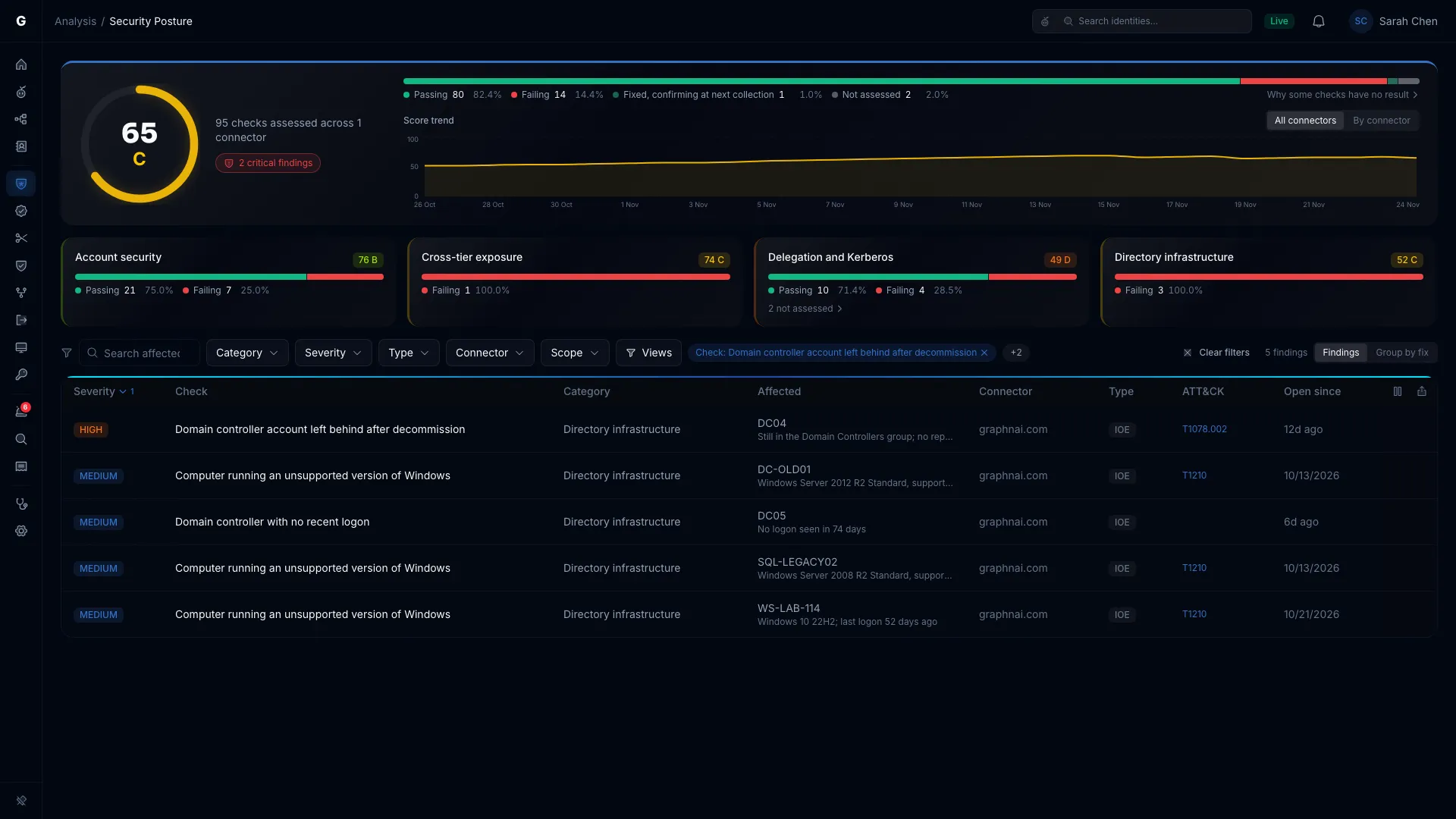
The detail line names the release and the date support ended, for example "Windows Server 2012 R2 Standard, support ended 10 October 2023". For a quiet computer it adds how many days since the last logon.
How to fix it
GraphnAI has no automated fix. The repair is done on the computer:
- Upgrade it to a supported release.
- Or retire it. For a computer that has been quiet for a long time, confirm it's gone, then disable and remove the account.
Domain controller account left behind after decommission
Severity: High. A computer account still carries a domain controller's flags, but the controller is out of service. The account keeps every right of the Domain Controllers group until someone runs the metadata cleanup.
The check lists an enabled domain controller account when either of these is true:
- No server object in the forest's configuration refers to it. That's what a completed decommission leaves behind.
- Its machine password is older than 180 days. A controller changes it every 30 days by default, so 180 days is six missed changes.
If GraphnAI can't read the password age, the check doesn't call the controller decommissioned.
How to fix it
- Open the finding and confirm the controller is retired.
- Select Select Fire. The preselected step disables the account. Disabling stops the account authenticating to the domain, so a controller still serving the domain would be interrupted.
- Review the preview and approve the change.
Disabling the account clears the finding. Removing the account and its replication metadata is a manual step in the directory's own cleanup. See Select Fire.
Domain controller with no recent logon
Severity: Medium. The controller is still registered in the forest and still changes its machine password, but no logon has been seen for 30 days. It may be an unused spare, or it may have stopped serving clients.
This check is the sibling of the previous one, so one controller never raises both. A controller whose machine password is current and whose server object exists is quiet, not decommissioned. A controller that has no logon recorded at all is also listed.
GraphnAI has no automated fix, because disabling a registered domain controller would break the domain. Confirm whether the controller is still needed. If it isn't, demote it and clean up its metadata.
Why a controller check reads Not assessed
The two domain controller checks need GraphnAI to match each controller to its server object in the forest's configuration. If that read didn't finish on a connector, both checks read Not assessed there. They never report every controller as decommissioned. A Not assessed check is never a pass. See How results read.
Reviewing and acting on a finding
- Select Exposure > Security Posture.
- Select the AD infrastructure card to show only this category. Select it again to clear it.
- Narrow with Severity, Check and Connector.
- Select a row to open the finding's drawer. The evidence, Why this matters and How to fix it follow the check's description.
- Where a fix exists, the drawer offers Select Fire. Checks without one show a note instead.
- Select Export to download the filtered findings for a change ticket.
A fixed finding stays in the list until the next collection confirms the fix.
Configuration
These checks have no settings. The 30-day logon limit for computers is the same one the Identity Inventory uses to mark a computer Stale.
Troubleshooting
A computer you know is out of support isn't listed
The computer may be outside the check. It's disabled, it reports no operating system or version, or it's a Windows 11 or LTSC computer with no build number. A release newer than the product's table isn't judged until an update adds it.
A computer under Extended Security Updates is listed
That's expected. ESU isn't visible in the directory.
A computer reads Low although it's a server
Its last observed logon is more than 30 days old. It's probably switched off. Confirm, then disable and remove the account.
Both domain controller checks read Not assessed
The forest configuration read didn't finish on that connector. The checks run again after the next sync that finishes it.
A decommissioned controller isn't in the orphaned list
The account may be disabled already, or its machine password age wasn't collected. Check that the sync collects pwdLastSet.