Fix it safely
Fix the cause. Keep the undo.
Select Fire simulates each fix on your live graph before anything changes in your directories, scores how safe it is, and runs only changes GraphnAI can reverse. You decide how much runs on its own.
The remediation gap
By hand is too slow. Blind automation breaks things.
The backlog never shrinks.
You find GenericAll on a Tier 0 group. Before you touch it, you need to know who relies on it, what breaks, and how you'd put it back. That's an afternoon per finding.
Something breaks at 2 AM.
A script strips access that looked unused. A service account that runs one nightly job loses a group it needed, and nobody recorded what changed.
GraphnAI sits between the two. It finds the cause, shows the blast radius before anything changes, and lets each change run only as far as the evidence allows. Anything it runs can be undone.
Select Fire
Select Fire™ fixes the cause, not every symptom.
Open Select Fire from a finding, or with "Revoke this relationship" in an identity's flyout.
- Preview. Pick what to remove. From a finding, the recommended changes come preselected.
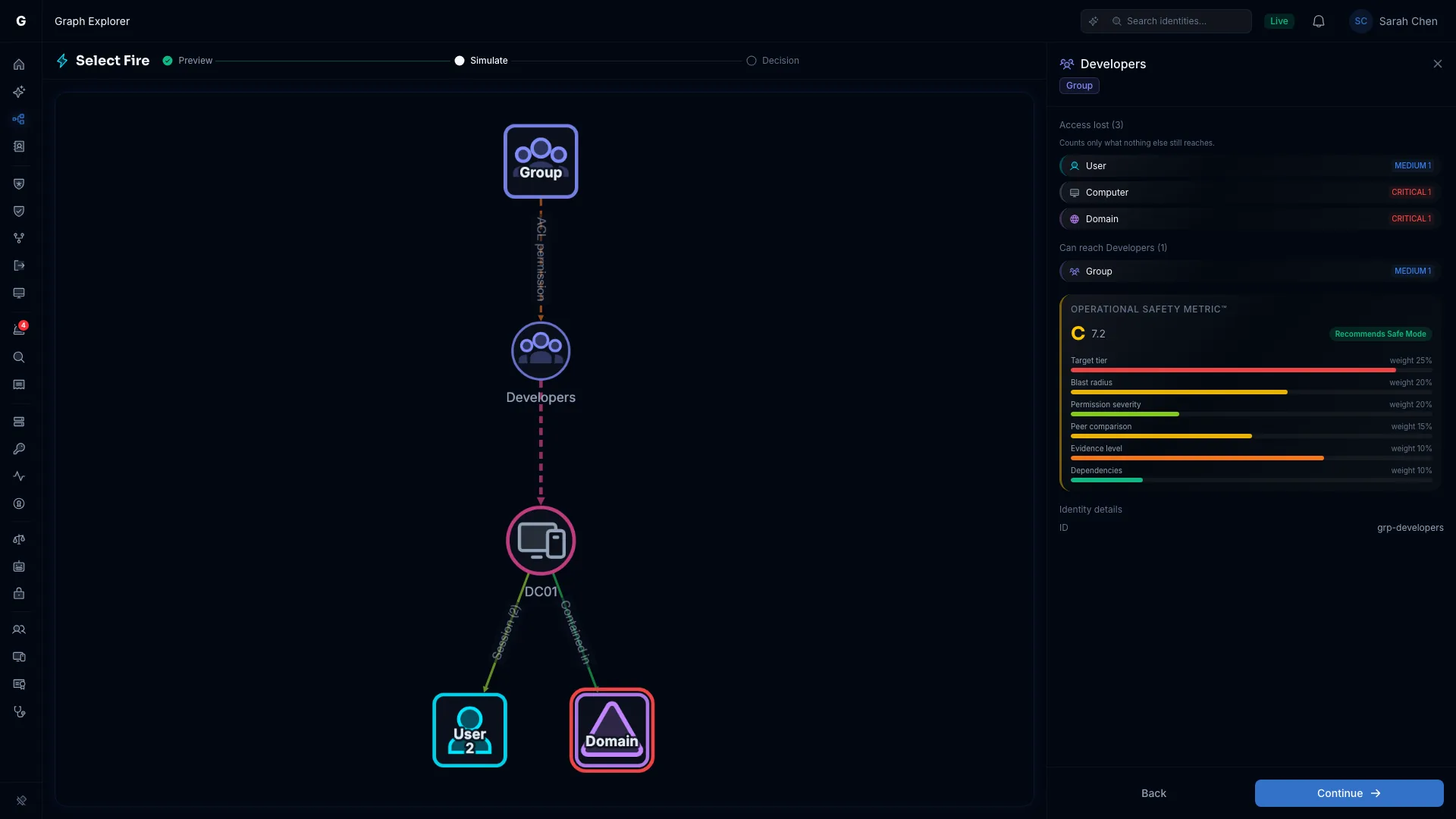
- Simulate. See who loses access and how safe the change is.
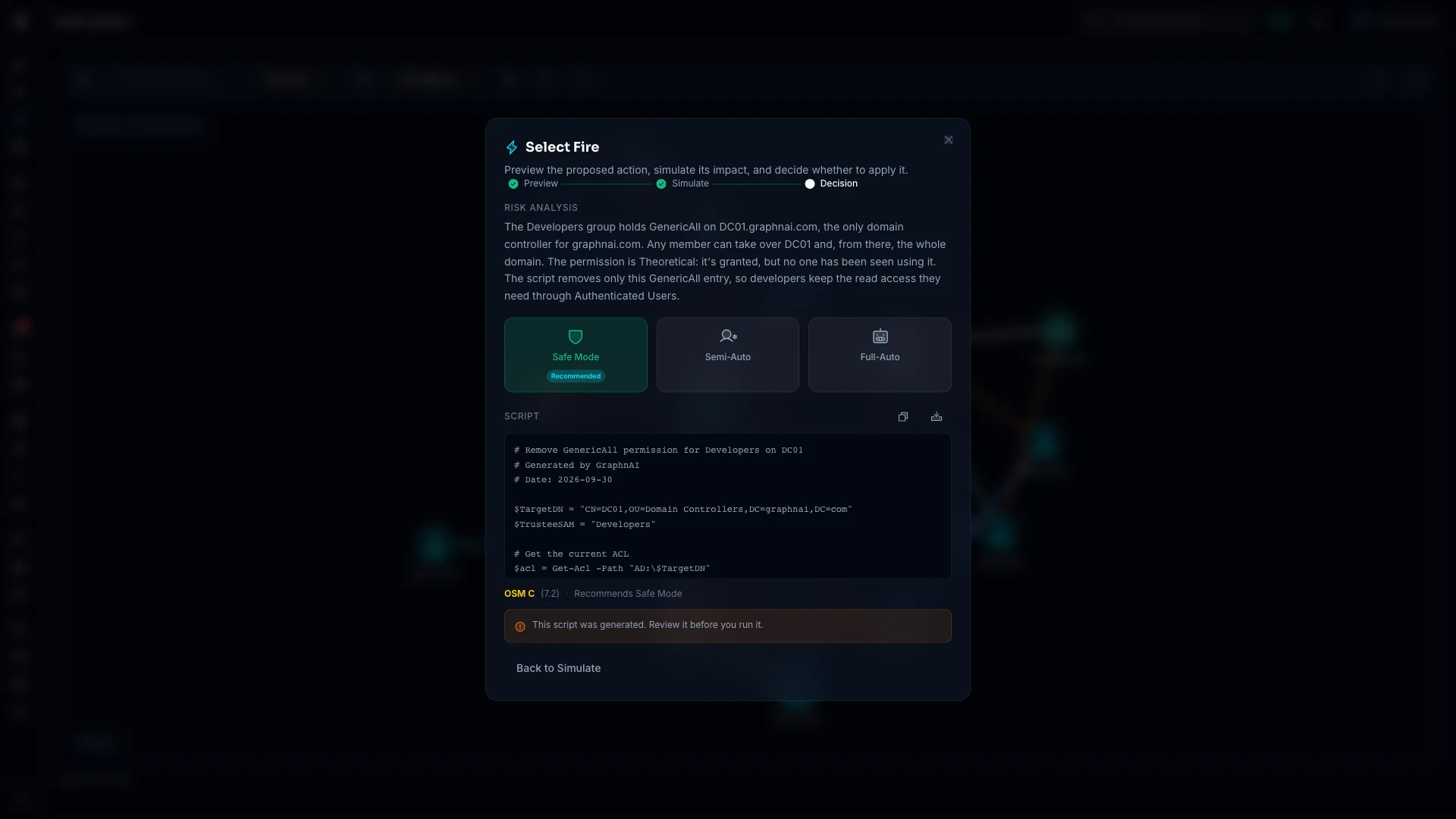
- Decision. Pick Safe Mode, Semi-Auto or Full-Auto.
The plan asks why the identity is exposed, and the answer is often a different object. It prefers a fix that clears the finding over one that only contains it, and never suggests one that would do nothing.
Admins also get a short written reason for the plan. An AI model writes the words, and every number in them comes from the risk engine.
The Select Fire guide Risk narrative and gradient of control
- DC01A domain controller account flagged twice: a crackable service principal name, and too many privileged groups.
- member of
- Domain ControllersGroup
- nested inRecommended: remove this nesting
- Enterprise AdminsForest-wide reach
Simulate and score
See the blast radius before anything changes.
A simulation is a what-if overlay on your live graph, and nothing changes in your directories. The panel counts what the subject stops reaching and who loses a path through it, leaving out anything still reachable another way.
The Operational Safety Metric™
Eight factors with fixed weights give a score from 0 to 100, lower is safer. The same inputs always give the same score.
- Target tier
- Tier gap
- Blast radius
- Permission severity
- Peer comparison
- Evidence level
- Dependencies
- Usage intensity
The score sets the recommended mode, from Full-Auto for the safest changes to Safe Mode for the riskiest. If it can't be computed, you only get a script.
Three modes
You choose how much runs on its own.
The safety score marks one mode Recommended. Each action also shows the highest mode it can run at, and why it can't go higher.
Writes the script.
- A PowerShell script you review and run yourself.
- Its commands carry
-WhatIf, so they change nothing until you remove it. - It checks the current state first, so running it twice is harmless.
Scripts are for Admins and use the AI model you configure.
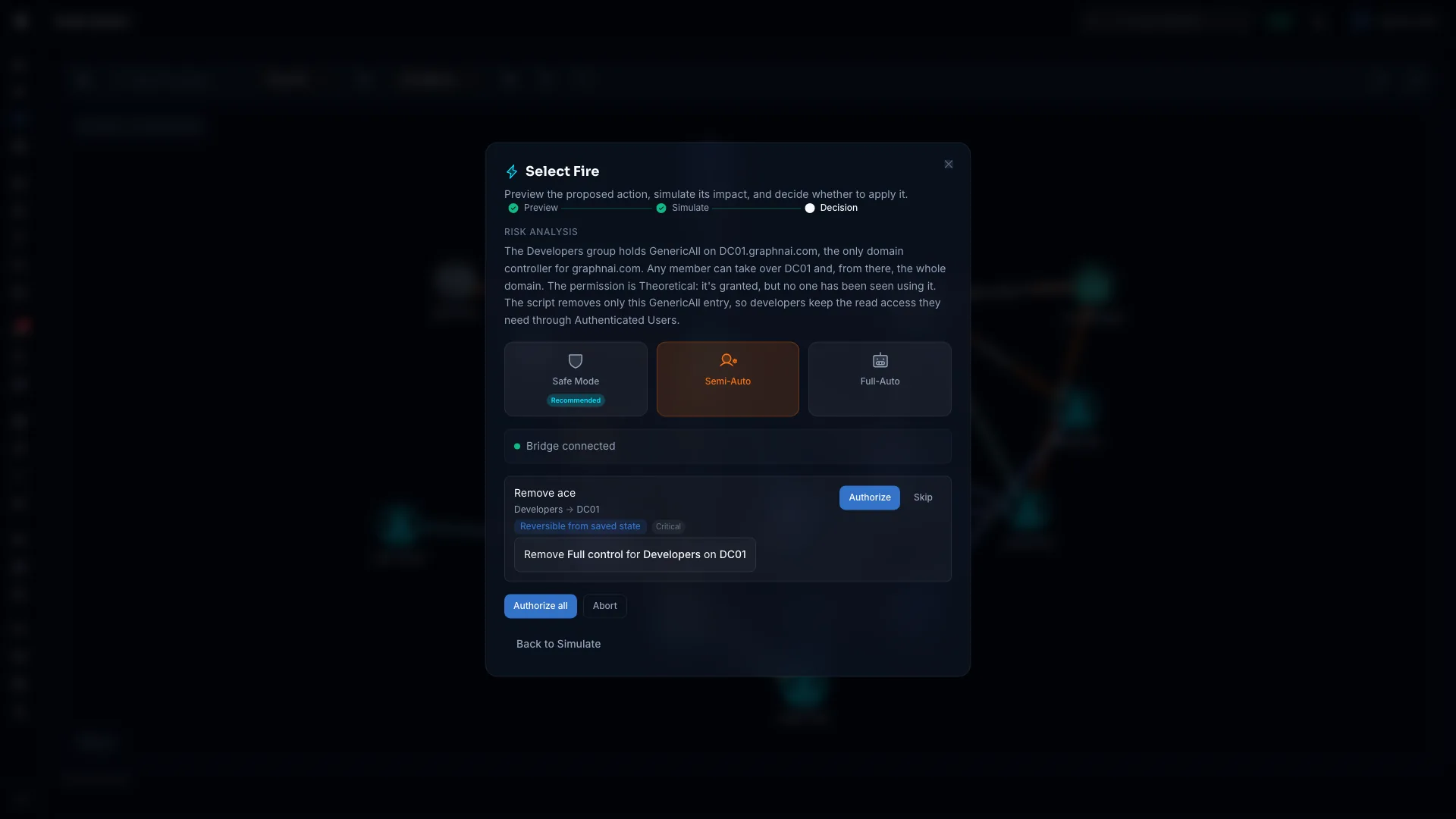
Waits for your click.
- Authorize or skip each action, or authorize them all.
- Changes go through the Identity Bridge or Microsoft Graph, with write credentials separate from the ones GraphnAI syncs with.
- An action reads Verified only once the directory shows the change took effect.
Runs only what has earned it.
- Every permission the identity holds must have been seen in use, so a new deployment starts with no identity eligible.
- Never a Tier 0 or Tier 1 target, a platform Admin, or a change it can't undo.
- Arming starts with a week of shadow mode by default, and a Stop all automation button is always there.
Full-Auto runs account-level fixes, such as disabling a user. Group memberships and permission entries always wait for a person.
What it can change
Down to one right in one permission entry.
Most Active Directory access is granted by permission entries (ACEs) on each object. Select Fire removes a whole entry or a single right in it, and names rights in plain words: "Change permissions", not WriteDacl.
DCSync gets its own row. Its three replication rights go together by default, because any one left behind still lets the account replicate.
Undo puts the exact entry back where it was. A removal AdminSDHolder would reset within the hour is refused.
The inheritance blast radius, before you cut.
A delegation on an OU applies to every object below it. Select Fire removes it where it was granted, and the preview counts the objects that lose the right and names any the trustee keeps another way.
Container removals run in Semi-Auto.
Delegation findings that come with the fix.
Three Kerberos delegation findings on Security Posture, and five related permission checks, come with a fix in Select Fire.
A person always approves delegation changes. Domain controllers are refused, because they need these settings.
- Remove a group membership, Group Policy link or service principal name
- Remove a permission entry or one right in it, including DCSync
- Disable, enable or move an account
- Require Kerberos pre-authentication, a password, or a password change
- Change constrained delegation, clear a stale adminCount
- Remove a directory role, app role or OAuth permission grant
- Block or allow Entra sign-in
- Quarantine a hybrid account in both directories
- Never run, because they can't be undone: a password reset, revoking Entra sessions on their own, removing SID history.
- Never, by anyone: any change to krbtgt.
- A person types the name first: the built-in Administrator, the Domain Controllers group, objects the directory marks critical. Automation and API keys can't confirm.
Undo and Closed-Loop Rollback
Every change can come back. Some come back on their own.
Before GraphnAI changes the directory, it saves the original state, such as the exact group a member left. Undo restores from that copy through the same checked path, so it never guesses. The History tab shows Reverted once the directory confirms it.
Closed-Loop Rollback
Full-Auto changes get a rollback watch. If a watched host starts failing, a hygiene change is undone automatically. A containment change, such as disabling a compromised account, never undoes itself. A person gets the alert instead.
Only watched hosts count, so an attacker flooding sign-ins from their own machine can't trigger a rollback. A burst of rollbacks pauses Full-Auto.
Semi-Auto changes aren't watched, but for two weeks GraphnAI tells you if someone reverts one outside it.
- 0 minThe directory confirms the changeThe receipt logs "Rollback watch started".
- Every 2 minSweep the watched hostsFailed sign-ins against each host's own history, plus failed services.
- 90 minThe window closesExtended if a sync overlaps it, so a sync never hides a failure.
If a watched host fails:
The decision record
Who ran it, what changed, and how to undo it.
The History tab records every action that reached execution, whatever the result. Each receipt has a link you can paste into an incident report.
A name, or the policy that allowed it.
- Who authorized it, or which automation ran it.
- The mode, and whether it was containment or hygiene.
- Full-Auto actions also go to the governance audit log.
Before and after, read back from the directory.
- The attributes, such as an account's groups before and after a removal.
- Each step of a multi-step action, such as a quarantine across both directories.
- A timeline, including later events such as "Changed back in the directory".
The decision, kept as it was made.
- The permitted mode, risk score and safety score at that moment.
- Why it was recommended, and which recommended actions ran.
- The Undo button, on the same row.
Run your first simulation on your own directory.
The Public Preview is free for 30 days from your first sync, on your own server. A simulation changes nothing in your directories.