See what's real
Every attack path, and how much proof stands behind it.
Full control of a privileged group and a harmless inherited read are both one permission. Most tools count them the same, then draw ten thousand lines. GraphnAI weighs each one, finds the few accounts where paths meet, and shows which steps it has seen in use.
Tiered Fidelity™
Three levels of evidence on every relationship.
A path drawn from directory configuration is a hypothesis. GraphnAI labels how far each step has been checked, raises the label as evidence arrives, and uses it to rank fixes and decide what Full-Auto may touch.
- TheoreticalConfigured in the directory, like a group membership or an ACL entry. Nothing else has been checked. Every relationship starts here.
- ConstrainedA constraint on it has been checked, like a disabled account, a Group Policy setting or a Conditional Access policy, whether it allows the access or blocks it.
- ValidatedTelemetry has seen it in use, in a sign-in or a privilege-use event. It’s the level you want on a Select Fire plan’s evidence badge.
Risk dashboard
One risk score, eight factors you can open.
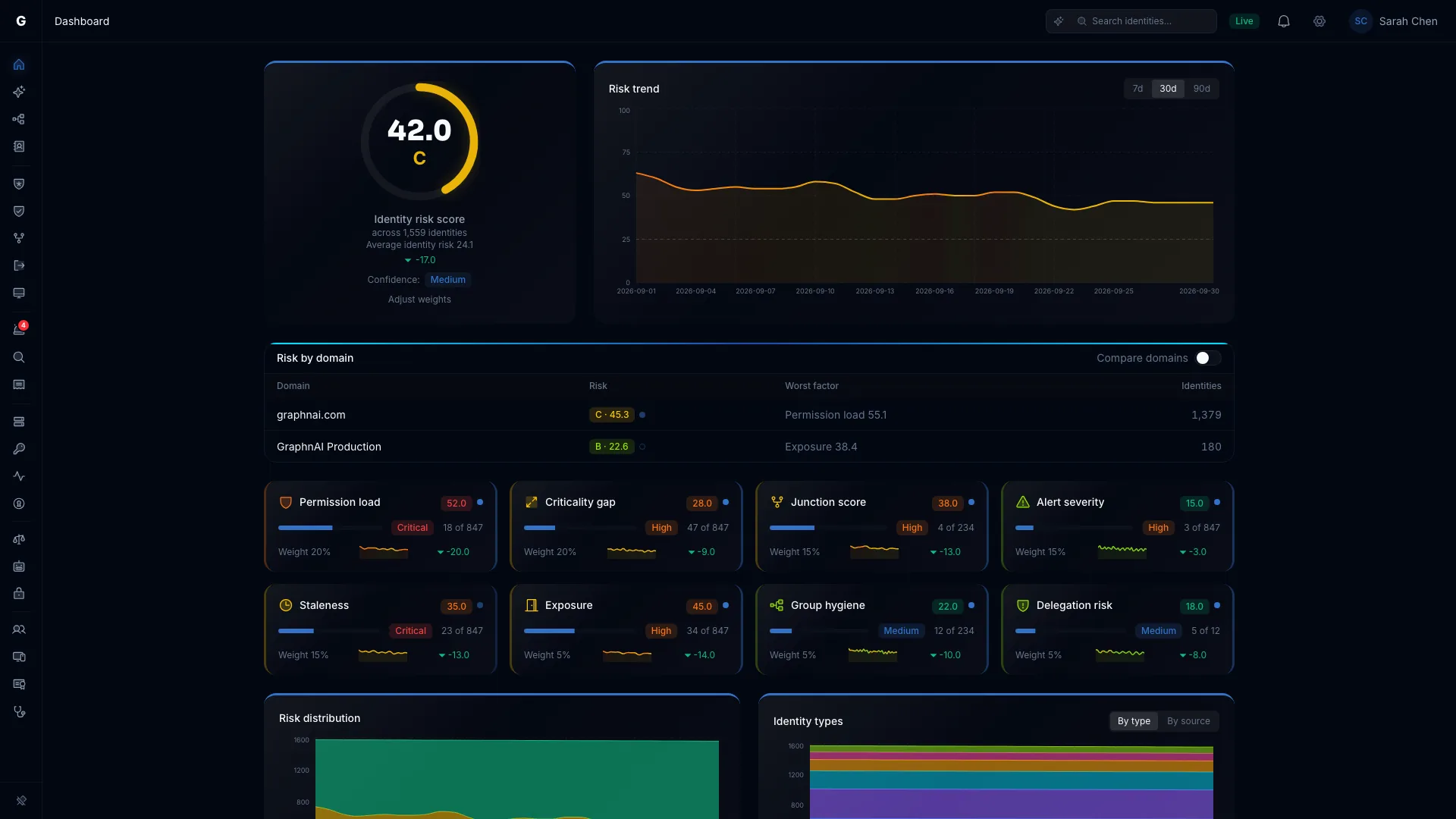
The identity risk score is built from eight factors you can read and reweight. Each card opens the list behind it, so a number on a slide is never a dead end.
- Permission load
- Criticality gap
- Junction score
- Alert severity
- Staleness
- Exposure
- Group hygiene
- Delegation risk
Track the trend, compare domains side by side, and see which identities sit at the top and why.
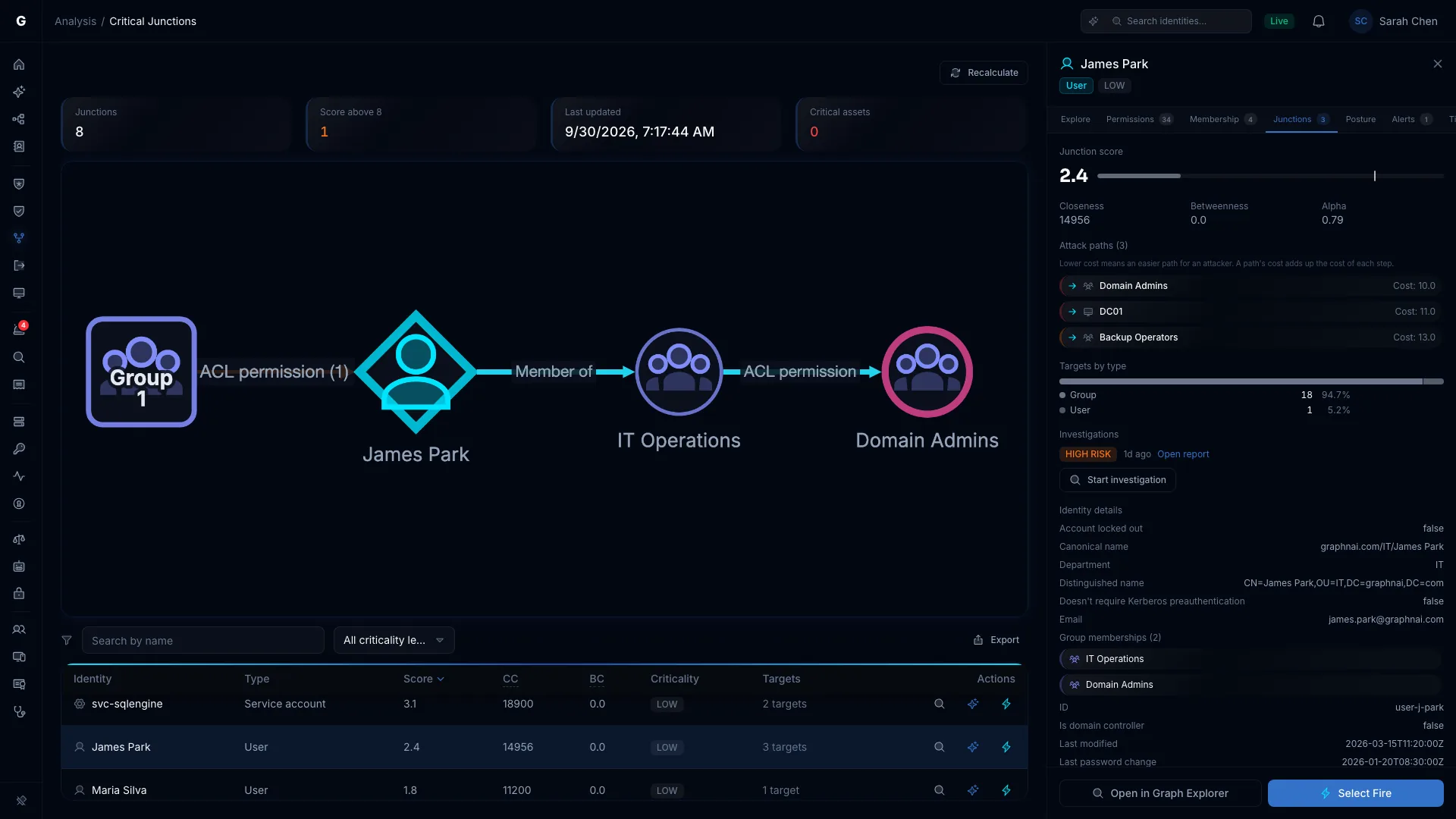
Critical Junctions
Close one step, not a hundred.
Most accounts are dead ends for an attacker. A few sit where many paths meet. GraphnAI ranks accounts by how close they are to your critical assets and how many attack paths pass through them.
Fix the account at the top and a whole fan of paths closes at once.
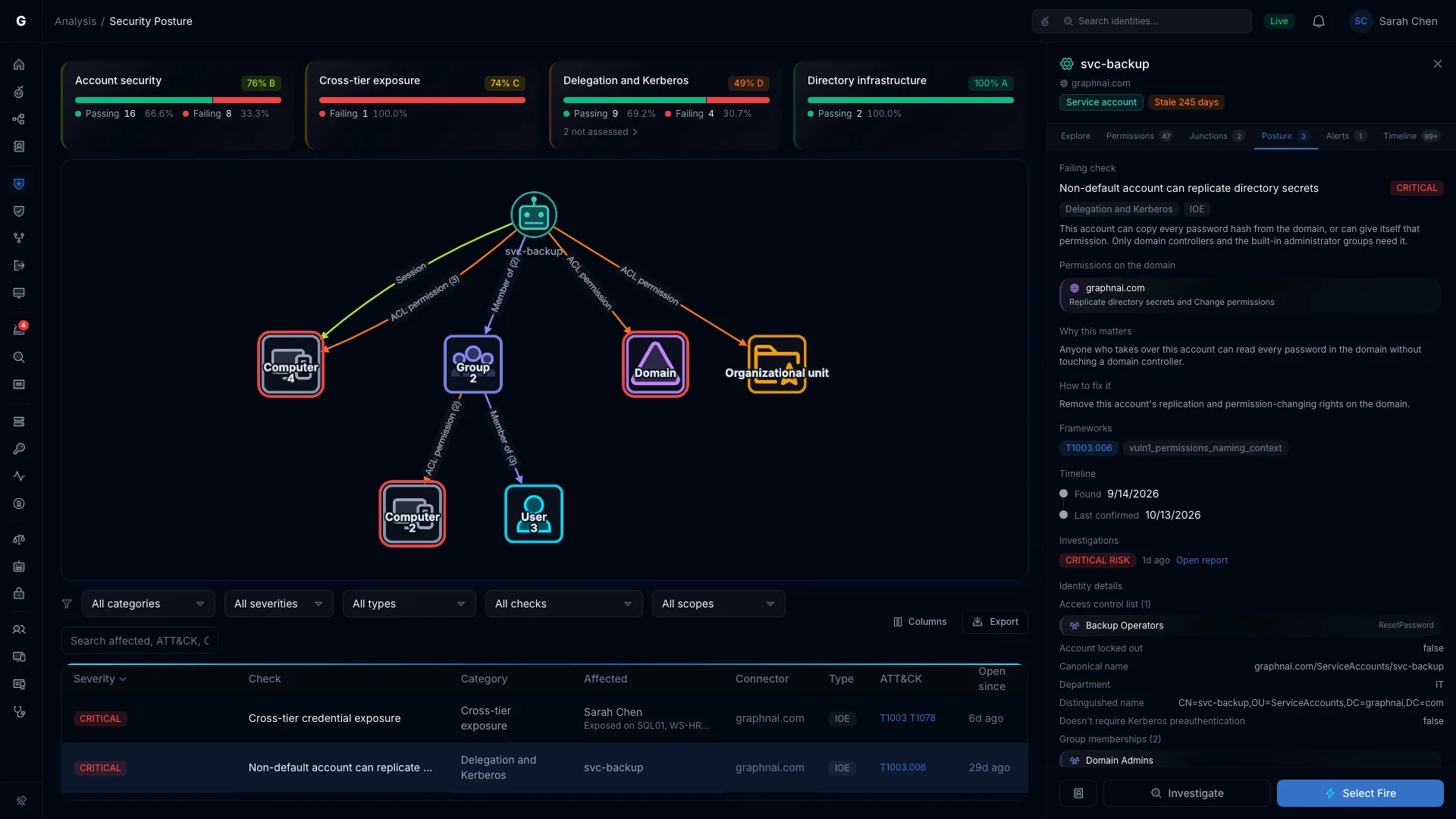
Security posture
Checks that come with the fix attached.
Security Posture runs its checks after every sync, with nothing to turn on. They cover credentials, built-in accounts, privileged groups, delegation and Kerberos. Each failing check says what's exposed, why it matters, how to fix it, and which ATT&CK technique it maps to.
Delegation Risk checks every OU and container with custom delegations against Microsoft's best practice. It flags dangerous rights like GenericAll, delegations that cross control planes, and trustees nobody uses any more.
What directory-only tools miss
Some risks only show up when you watch.
A Tier 0 admin signs in to a workstation where a help desk account holds SeDebugPrivilege.
The help desk account's groups look fine. It reads memory on a machine it already controls and leaves with a Tier 0 credential. GraphnAI sees the Tier 0 session and the privilege on the same computer and reports it as Critical, with Validated evidence.
Including the admins nobody added on purpose.
The Asset Criticality Engine rates every identity from Low to Critical after each sync. It finds the obvious Tier 0, like Domain Admins and Global Administrator, and the accounts that reach admin rights through nested groups and role assignments.
Identity Inventory
Every identity, human or not, in one table.
Stale accounts
Identities past their inactivity threshold. Dormant Tier 0 and Critical accounts are marked urgent.
Over-permissioned
Identities that hold far more than peers in the same role, counting permissions inherited through nested groups.
Non-human identities
Service accounts, managed service accounts, service principals, app registrations and managed identities, with their credentials, owners and risky settings.
Hybrid
On-premises and cloud identities in one graph.
Active Directory comes in through the Identity Bridge and Entra ID through Microsoft Graph, with roles, OAuth2 grants, Conditional Access, PIM, Group Policy and domain trusts. When an on-premises account syncs to Entra ID, the graph links the two, and the Escape columns show which identities can reach into another security boundary. What GraphnAI connects to
See which of your paths are real.
The Public Preview is free for 30 days from your first sync, on your own server.